
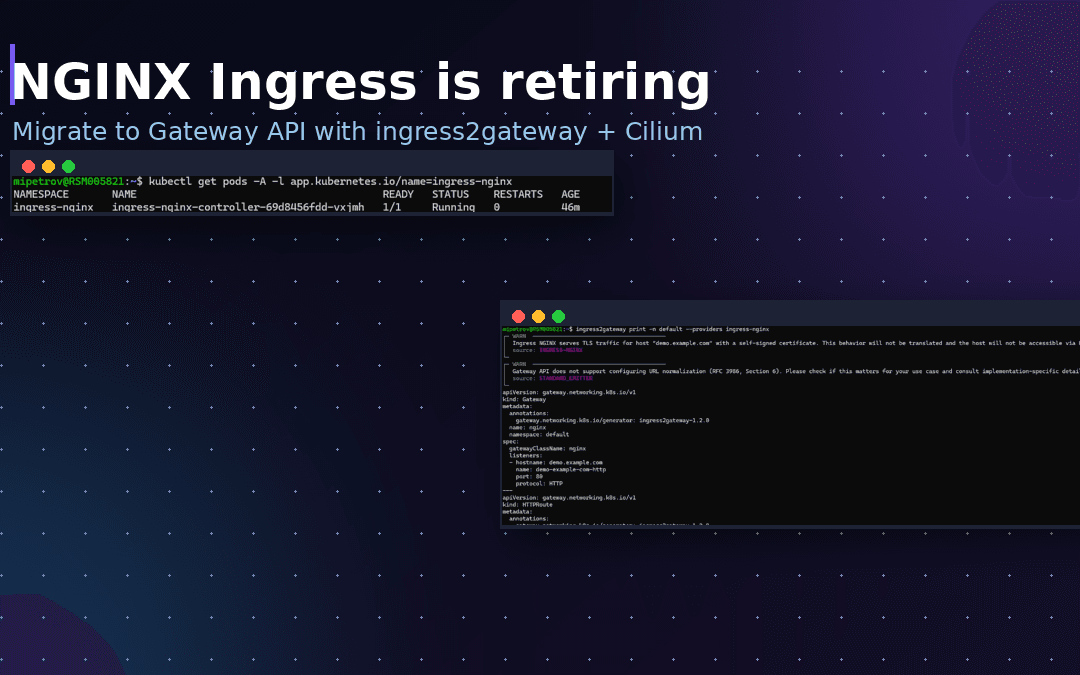
If you run Kubernetes, this one matters: the community Ingress NGINX controller has reached end of life. As of March 2026 the project is retired — no more releases, no bug fixes, and crucially no security patches. The GitHub repositories are now read-only. Installs keep working, but every day you use it unmaintained at the edge of your cluster, the risk grows. This guide explains exactly what reached end of life (it is narrower than the headlines suggest), how to check whether you are affected, and how to migrate — with a real example we ran on our own cluster.
TL;DR
- The community
ingress-nginxcontroller is retired as of March 2026 — no more releases and no security patches. - The Kubernetes Ingress API itself is not gone — it is just frozen. And F5’s commercial NGINX Ingress Controller is a different product that is still maintained.
- Check if you are affected in one command, then migrate — the recommended path is the Gateway API, and
ingress2gatewaydoes most of the conversion for you.
What exactly reached end of life?
There is a lot of confusion here, so let’s be precise. Three different things share the “NGINX Ingress” name, and only one of them is retired:
- Ingress NGINX (community) — RETIRED. This is
kubernetes/ingress-nginx, the hugely popular controller maintained by Kubernetes SIG Network. It uses NGINX as a reverse proxy behind the Kubernetes Ingress resource. For years it was maintained by only one or two volunteers, and SIG Network has now retired it. This is the one at end of life. - The Ingress API — frozen, not gone.
Ingressis still a built-in Kubernetes API object. It is not being removed, but it is feature-frozen: no new capabilities are being added. You can keep using it with a different controller. - F5 NGINX Ingress Controller — still maintained. This is
nginxinc/kubernetes-ingress, a separate product from F5. It is not affected by the community project’s retirement.
So “Kubernetes Ingress NGINX end of life” specifically means the community ingress-nginx controller. If that is what you are running — and roughly half of all clusters are — you need a plan.
Why you can’t just ignore it
Your ingress sits at the front door of the cluster: it terminates TLS and routes untrusted traffic from the internet to your Services. That is exactly the kind of component you never want running unpatched. After retirement, any newly discovered vulnerability in it will never be fixed. Given its history of serious CVEs, staying on it after end of life is a growing security liability, not a stable “if it isn’t broken, don’t touch it” situation. Deployments won’t break overnight, but the clock is running — and the longer you wait, the harder it is to get a clean, low-risk migration window.
Step 1 — Check whether you are affected
Before anything else, find out if the retiring controller is running in your cluster. One command tells you:
kubectl get pods -A -l app.kubernetes.io/name=ingress-nginx
ingress-nginx-controller pod like this, you are running the retired community project and should plan a migration.It also helps to list the resources that depend on it, so you know the scope of the migration:
kubectl get ingress -A
CLASS: nginx needs a new home once the project is retired.Your options after end of life
You have two realistic paths, and the right one depends on how much time and appetite you have for change:
- Option A — Migrate to the Gateway API (recommended). The Gateway API is the official successor to Ingress: a stable, actively developed, role-oriented standard. This is the “modernize while you’re here” path, and it future-proofs your edge. Many implementations exist (Cilium, Envoy Gateway, Istio, NGINX Gateway Fabric, cloud providers).
- Option B — Lift-and-shift to another controller. Swap
ingress-nginxfor a maintained alternative (for example Contour or F5’s NGINX Ingress Controller) and keep your current Ingress resources. It is faster, but it is a stopgap: the Ingress API is frozen, so you’ll likely move to the Gateway API eventually anyway.
For most teams we recommend Option A. If you are already running Cilium as your CNI, you may not even need a new component — Cilium ships a Gateway API implementation (see our guide on installing the Kubernetes Gateway API with Cilium). That is exactly the setup we’ll migrate to below.
Step 2 — Convert your Ingress with ingress2gateway
You do not have to rewrite your routing by hand — you can use a tool for the bulk of it. The Kubernetes SIG-maintained ingress2gateway tool reads your current Ingress resources (including many of its annotations) and emits equivalent Gateway API manifests. Install it and run:
# grab the binary (Linux x86_64)
curl -sL https://github.com/kubernetes-sigs/ingress2gateway/releases/download/v1.2.0/ingress2gateway_Linux_x86_64.tar.gz | tar xz
sudo mv ingress2gateway /usr/local/bin/

# convert everything in the 'default' namespace that belongs to ingress-nginx
ingress2gateway print -n default --providers ingress-nginx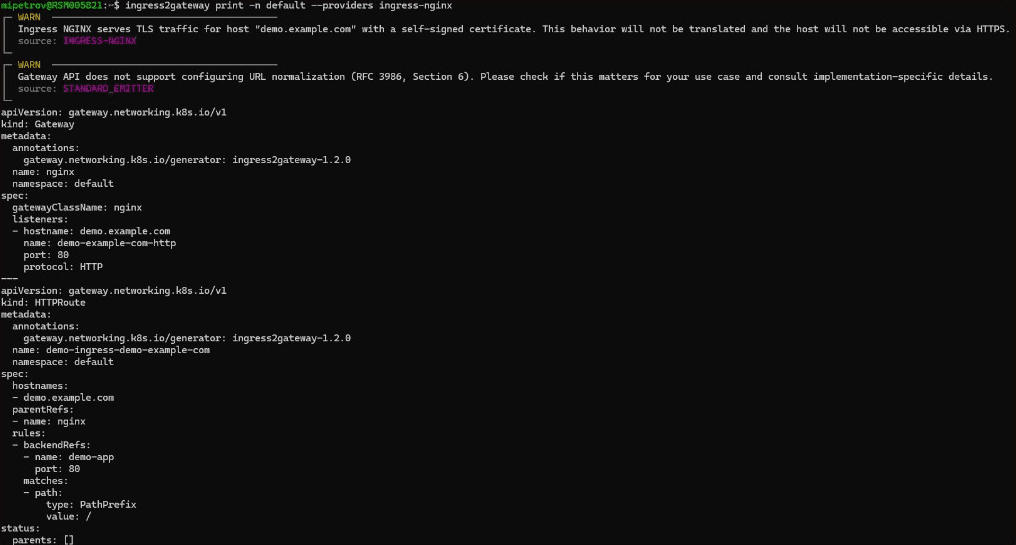
ingress2gateway turns one Ingress into a Gateway plus an HTTPRoute — and warns you about anything that doesn’t translate cleanly.Read the warnings — they matter. In our run, the tool flagged two things that will not carry over automatically:
- TLS with a self-signed certificate was not translated — you’ll re-create TLS on the Gateway listener (usually with a proper cert via cert-manager).
- URL normalization (an NGINX behavior) has no Gateway API equivalent — check whether your app relies on it.
This is the honest reality of the migration: the tool handles the routing shape (hosts, paths, backends) very well, but NGINX-specific annotations — rewrites, auth, rate limiting, custom snippets — may need manual work on the target implementation. Always review the generated YAML before applying it.
Step 3 — Point it at your Gateway controller and apply
By default the tool sets gatewayClassName to match your old ingress class (nginx). Change it to the GatewayClass of your chosen implementation — here, cilium — then apply:
# save, retarget to the Cilium GatewayClass, and apply
ingress2gateway print -n default --providers ingress-nginx > converted.yaml
sed 's/gatewayClassName: nginx/gatewayClassName: cilium/' converted.yaml > converted-cilium.yaml
kubectl apply -f converted-cilium.yaml
Then confirm the new Gateway is programmed by Cilium and the route is live:
$ kubectl apply -f converted-cilium.yaml
gateway.gateway.networking.k8s.io/nginx created
httproute.gateway.networking.k8s.io/demo-ingress-demo-example-com created

$ kubectl get gateway
NAME    CLASS    ADDRESS   PROGRAMMED   AGE
nginx   cilium             True         5s

$ kubectl get httproute
NAME                            HOSTNAMES              AGE
demo-ingress-demo-example-com   ["demo.example.com"]   5s
HTTPRoute that replaced the old Ingress rule — now served through the Gateway API on Cilium.PROGRAMMED: True means Cilium has accepted and configured the Gateway — the same routing you used to get from your Ingress is now served through the Gateway API, with nothing from the retired project in the path. (On a bare-metal or local cluster the ADDRESS stays empty until an LB IPAM/L2 or BGP setup hands out an external IP.)
Do it safely: run both in parallel
Do not rip out the old setup and hope. The safe pattern is to run the new Gateway API controller alongside the old one, validate the new routing (curl with the right Host header, check TLS, run your smoke tests), and then shift production traffic gradually — for example with weighted DNS — before you retire the old stack. This way you get an instant rollback if something behaves differently.
- Install your Gateway API implementation (or enable it in Cilium).
- Convert and apply the Gateway API resources (Steps 2–3).
- Validate in staging, then split traffic in production.
- Re-implement any NGINX annotations you still need on the new stack.
- Decommission the old setup once traffic is fully migrated.
If you are building this on Talos or want the underlying network sorted first, our companion guides cover installing Cilium on Talos Linux and enabling the Gateway API with Cilium — together they give you a modern, maintained edge to replace it.
The full migration script (copy & paste)
Here is the whole flow end to end — audit, convert, retarget to your Gateway API implementation, apply and verify. This is exactly what we ran on our own cluster; comments explain each step so you can adapt it to your setup.
#!/usr/bin/env bash
# Migrate off the retired community project to the Gateway API
# Example target: Cilium's built-in Gateway API implementation
set -euo pipefail

NS="default"                     # namespace holding your Ingress resources
GATEWAY_CLASS="cilium"           # your Gateway API implementation's GatewayClass
I2G_VERSION="v1.2.0"

# 1) AUDIT — are you running the retired community controller?
kubectl get pods -A -l app.kubernetes.io/name=ingress-nginx
kubectl get ingress -A          # which Ingress objects need migrating

# 2) Install the ingress2gateway conversion tool
curl -sL "https://github.com/kubernetes-sigs/ingress2gateway/releases/download/${I2G_VERSION}/ingress2gateway_Linux_x86_64.tar.gz" | tar xz
sudo mv ingress2gateway /usr/local/bin/

# 3) Convert Ingress -> Gateway API (review the WARN/INFO output!)
ingress2gateway print -n "${NS}" --providers ingress-nginx

# 4) Save, retarget to your GatewayClass, and apply
ingress2gateway print -n "${NS}" --providers ingress-nginx > converted.yaml 2>/dev/null
sed "s/gatewayClassName: nginx/gatewayClassName: ${GATEWAY_CLASS}/" converted.yaml > converted-gw.yaml
# IMPORTANT: review converted-gw.yaml and re-add any NGINX annotations you rely on
kubectl apply -f converted-gw.yaml

# 5) Verify the new Gateway is programmed and the route is live
kubectl get gateway               # expect: PROGRAMMED=True
kubectl get httproute

# 6) Validate (Host header), split traffic gradually, THEN decommission the old controller
# curl -H "Host: demo.example.com" http://<gateway-address>/
# helm uninstall ingress-nginx -n ingress-nginx   # only after traffic is fully migrated
Frequently asked questions
When is Ingress NGINX end of life?
Is the Kubernetes Ingress API being removed too?
Does this affect the F5 NGINX Ingress Controller?
How do I check if I’m running the retired controller?
kubectl get pods -A -l app.kubernetes.io/name=ingress-nginx. If it returns an ingress-nginx-controller pod, you are running the community controller. Also run kubectl get ingress -A to see which Ingress resources depend on it.What should I migrate to?
Will ingress2gateway convert everything automatically?
Conclusion
The Kubernetes Ingress NGINX end of life is a forcing function, not just a chore. The community ingress-nginx controller no longer gets security patches, so if it is running at the edge of your cluster you need to act. The good news: checking exposure is one command, and the tool turns the scary-sounding migration into a reviewable diff. Moving to the Gateway API — especially if you already run Cilium — means you get a maintained, modern, future-proof edge instead of a frozen one. If you’d like help planning or executing the migration without downtime, get in touch for a free consultation, or see our DevOps consulting and support.
For the real Gateway and HTTPRoute YAML from our own cluster after the conversion, see how we replaced Ingress NGINX with the Cilium Gateway API on Talos.
We’ve now walked several clients through this exact migration, and the pattern is always the same: the scary part isn’t the Gateway API, it’s the pile of NGINX annotations nobody documented. Our advice from the field — inventory those annotations before you touch anything, run the new stack in parallel, and shift traffic with weighted DNS so rollback is instant. ingress2gateway gets you about 80% of the way; budget real time for the last 20% (auth, rewrites, rate limits). And don’t wait for a CVE to set your timeline for you.
— Milan Petrović, Senior Cloud/DevOps Engineer · CKA, RHCE, RHCSA