
HashiCorp Vault is the de-facto standard for secrets management, but installing it is the easy part. What actually keeps your secrets safe is the set of disciplines you apply on day one — how you protect the unseal keys, who can read what, how apps authenticate, and how quickly you can revoke access. This guide walks through the HashiCorp Vault secrets management best practices we apply on real clusters, and every step is shown with output from a live Vault instance we built specifically for this article.
No theory-only screenshots here: you’ll see initialization, unsealing, audit, KV v2 versioning, least-privilege policies, AppRole for applications, the Transit engine, lease revocation, a small Python app reading a secret, and the Vault UI — all from a working setup. Follow these practices and you get a Vault that keeps your application credentials secure and easy to manage through the CLI and API. Secrets management done well is also a cornerstone of DevSecOps — security built into your delivery pipeline rather than bolted on at the end.
TL;DR — the best practices
- Never keep a single unseal key. Split it with Shamir’s Secret Sharing and distribute the shares; use auto-unseal (cloud KMS) in production.
- Turn on an audit device before you store your first real secret.
- Use KV v2 so every secret is versioned and recoverable.
- Give every app and human the least privilege — default deny, no root tokens for applications.
- Give every workload its own authentication method — AppRole (or Kubernetes auth) for apps and OIDC/LDAP + MFA for humans.
- Keep TTLs short and be able to revoke everything by prefix instantly.
- Use the Transit engine for encryption as a service so apps never touch key material.
1. Initialize Vault and protect the unseal keys
When you initialize Vault it generates a master key that encrypts everything in storage. The single most important best practice is to never hold that master key as one secret. Vault uses Shamir’s Secret Sharing to split it into multiple key shares, and you need a threshold of them to reconstruct it and unseal the vault.
Initialize with several shares and a quorum threshold — for example five shares where any three can unseal:
export VAULT_ADDR="http://127.0.0.1:8200"
vault operator init -key-shares=5 -key-threshold=3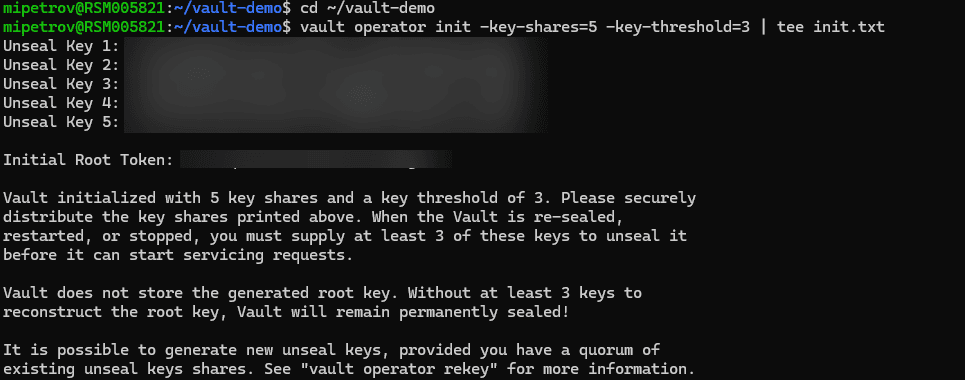
Distribute the shares to different trusted people and store them offline (a password manager per person, a hardware token, or a sealed envelope). No single individual should be able to unseal Vault alone. After init, unseal by supplying the threshold number of shares:
vault operator unseal # run once per key share, until the quorum is met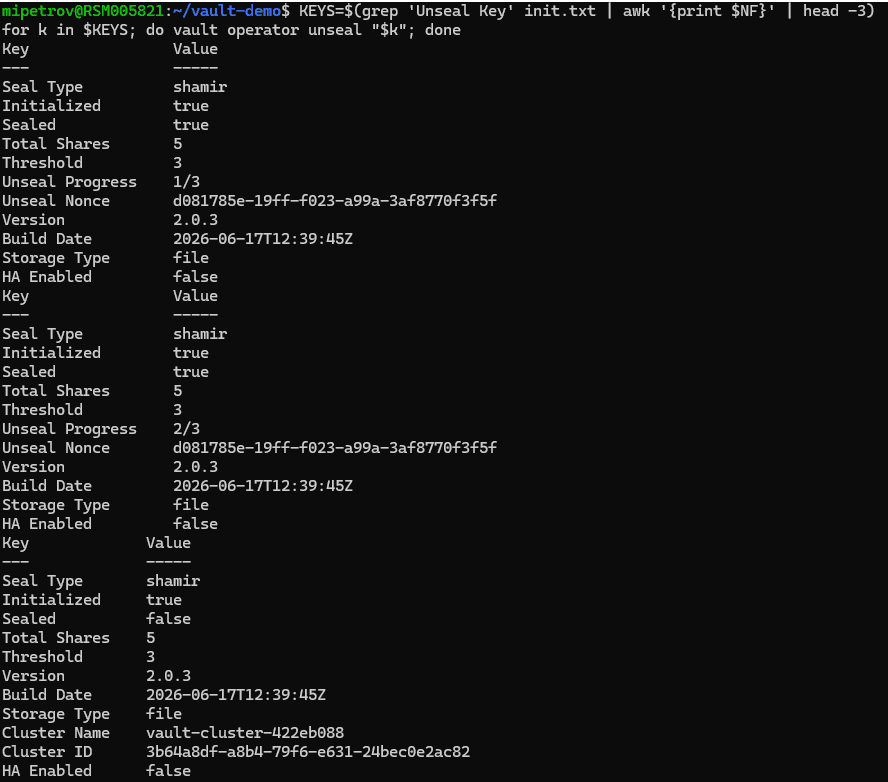
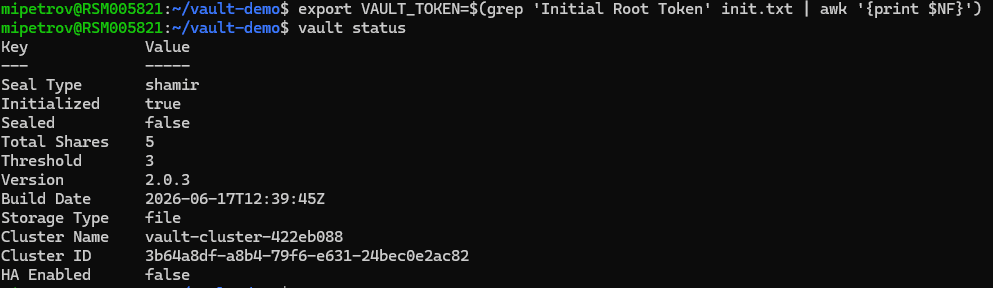
Production tip: unsealing by hand does not scale and is risky on restarts. Use auto-unseal backed by a cloud KMS (AWS KMS, GCP KMS, Azure Key Vault) or an HSM, and run Vault in HA with Integrated Storage (Raft). We’ll cover the HA Raft setup in a dedicated follow-up guide.
2. Enable an audit device from day one
An audit device records every request and response Vault handles, which is essential for compliance and incident response. Sensitive values are HMAC-hashed, so the log is safe to keep. Enable it before you store real secrets — a Vault without auditing is a black box.
vault audit enable file file_path=/vault/logs/audit.log
vault audit list -detailed
In production, ship the audit log to your SIEM (Splunk, Elastic, Loki) and alert on anomalies such as denied requests or root-token use. Enable at least two audit devices so a single failing sink can never block Vault.
3. Use KV v2 and version your secrets
The KV version 2 secrets engine adds versioning, soft delete, and metadata on top of plain key-value storage. That means a bad write can be rolled back and a deleted secret can be recovered — capabilities KV v1 simply doesn’t have. A typical example is a database password that several services need to read in a secure, versioned way.
vault secrets enable -path=secret kv-v2
vault kv put secret/app/db user="app" password="s3cr3t-v1"
vault kv put secret/app/db user="app" password="s3cr3t-v2"   # creates version 2
vault kv get secret/app/db
vault kv metadata get secret/app/db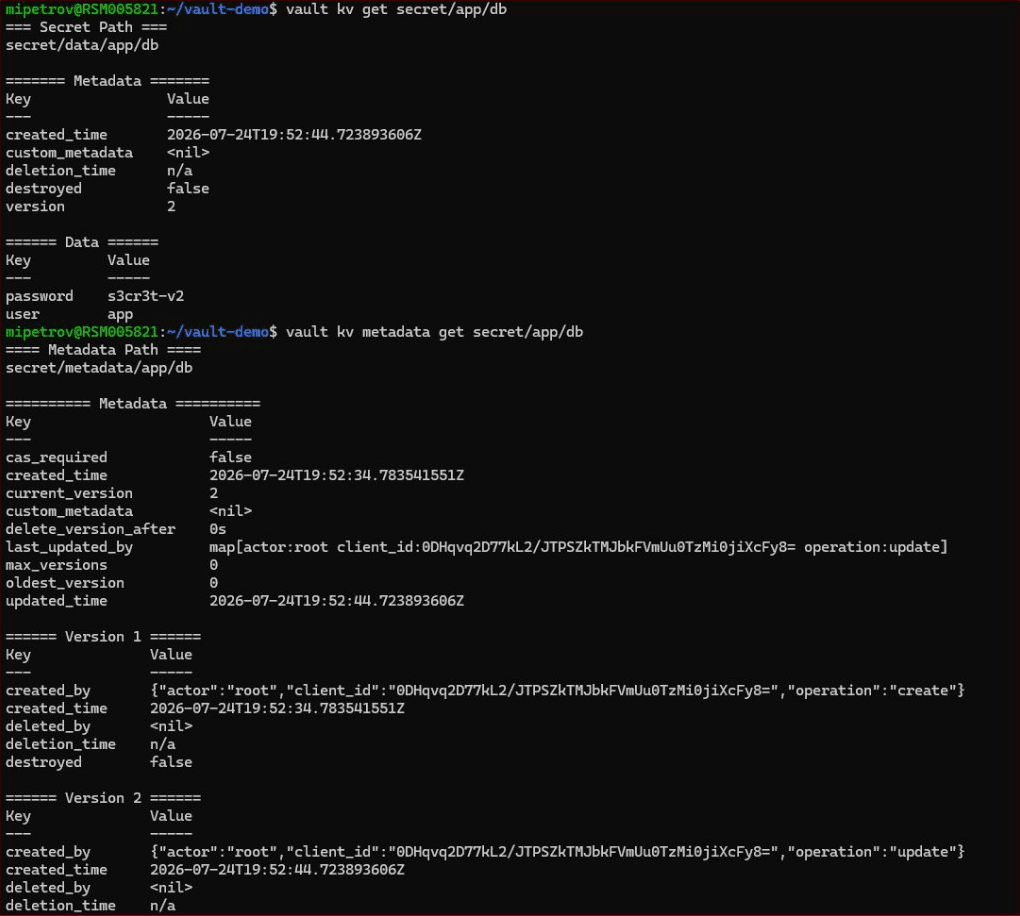
Set a sane max-versions on the mount so history doesn’t grow forever, and use check-and-set (cas) to prevent two writers from clobbering each other.
4. Apply least-privilege policies — no root tokens for apps
Vault denies everything by default; access is granted only through policies. The best practice is least privilege: each identity gets the narrowest set of capabilities it needs and nothing more. The root token is for break-glass and initial setup only — it should never be used by an application.
Here is a read-only policy that lets an app read exactly one secret path:
# app-ro.hcl — read only, on one path
path "secret/data/app/db" {
  capabilities = ["read"]
}
vault policy write app-ro app-ro.hcl
vault token create -policy="app-ro"
The proof is in what the token cannot do. A token with only app-ro can read its secret but is refused when it tries to write:
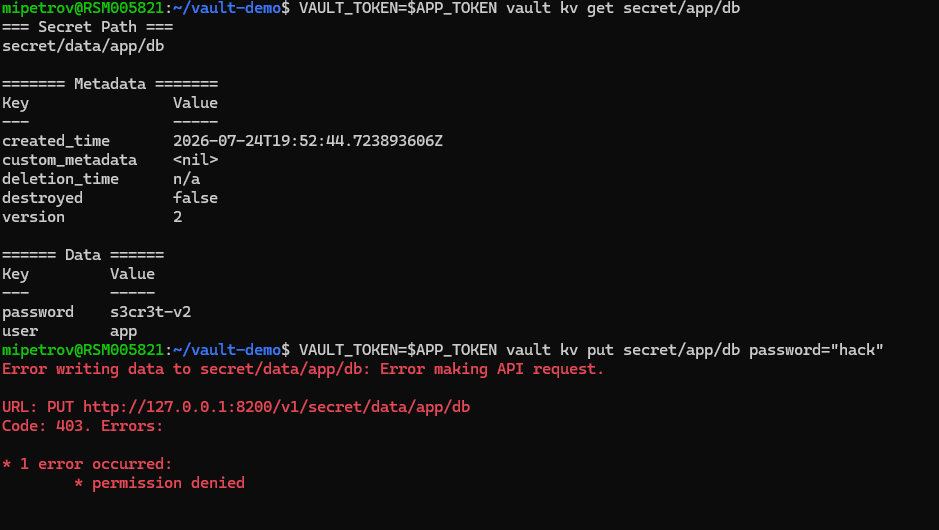
Keep your policies in Git and apply them through CI, so access control is reviewed and versioned like any other code.
5. Authenticate apps with AppRole (and humans with OIDC/LDAP)
Handing out static tokens is a common anti-pattern. For machine-to-machine access, use the AppRole authentication method: the platform team creates a role bound to a policy, and the application logs in with a role_id and a short-lived secret_id to obtain a scoped token. The app never stores long-lived credentials — it exchanges its role ID and secret ID for a token through the Vault API.
vault auth enable approle
vault write auth/approle/role/app \
token_policies="app-ro" token_ttl=15m token_max_ttl=30m
vault read auth/approle/role/app/role-id
vault write -f auth/approle/role/app/secret-id
vault write auth/approle/login role_id="..." secret_id="..."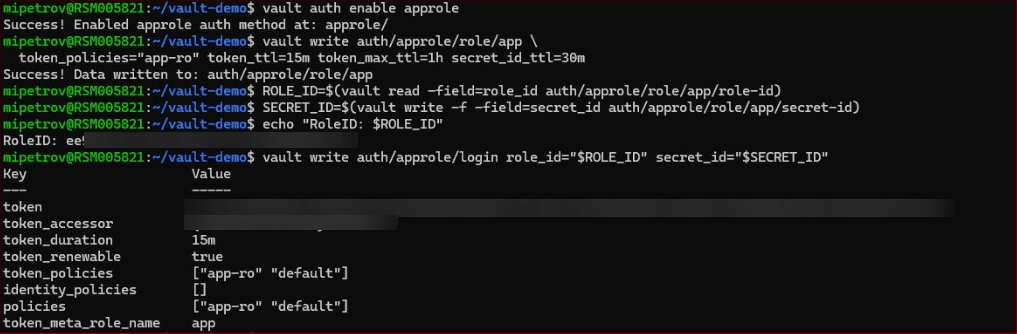
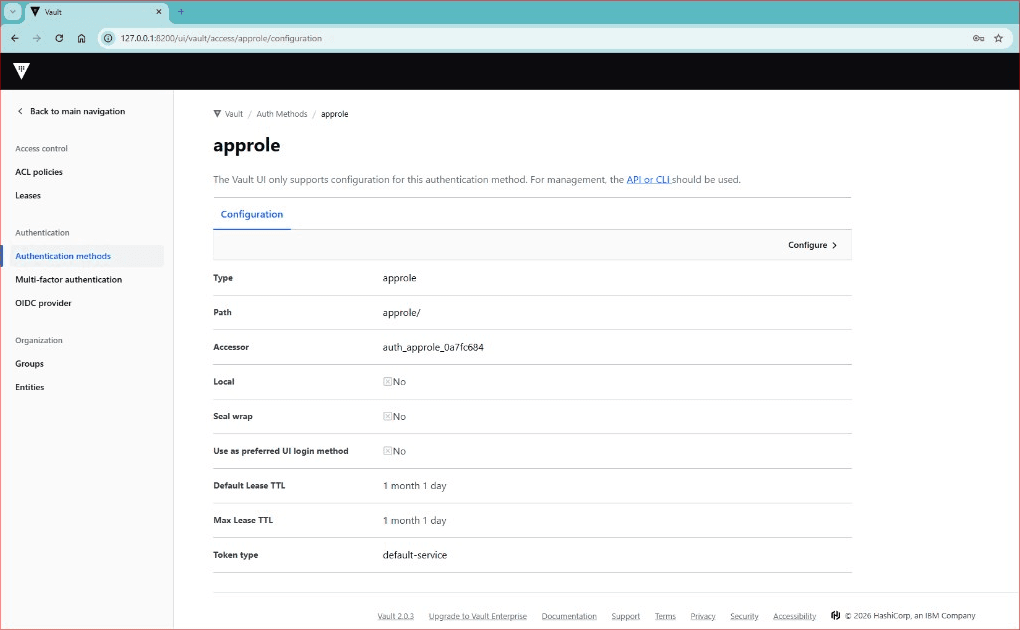
For humans, don’t create static tokens either — wire Vault to your identity provider with OIDC or LDAP and enforce MFA, so access follows your existing joiner/leaver process. For pods, the Kubernetes auth method lets workloads authenticate with their service account. (We’ll dig into LDAP and HA in the follow-up article.)
6. Read a secret from your application the right way
Applications should never embed a root token or a hard-coded database password. They authenticate with their own AppRole and read only the credentials they need through the Vault API. Here is a minimal Python example using the official hvac client:
#!/usr/bin/env python3
"""Read a secret from HashiCorp Vault using AppRole auth."""
import os
import hvac
client = hvac.Client(url=os.environ.get("VAULT_ADDR", "http://127.0.0.1:8200"))
# 1) authenticate with the app's own AppRole (never a root token)
client.auth.approle.login(
role_id=os.environ["ROLE_ID"],
secret_id=os.environ["SECRET_ID"],
)
print("authenticated:", client.is_authenticated())
# 2) read only the secret this app is allowed to read (KV v2)
resp = client.secrets.kv.v2.read_secret_version(
path="app/db", mount_point="secret"
)
data = resp["data"]["data"]
print("db user: ", data["user"])
print("db password:", data["password"])
In production, don’t pass the secret_id in plain environment variables by hand — inject credentials with Vault Agent or the Vault Secrets Operator, cache the token, and renew the lease before it expires.
7. Use the Transit engine for encryption as a service
Sometimes you don’t want to store a secret in Vault — you want Vault to encrypt and decrypt data for you without your application ever seeing the key. That’s the Transit engine: encryption as a service, with centralized, secure key management and rotation, all exposed through the Vault API.
vault secrets enable transit
vault write -f transit/keys/app
vault write transit/encrypt/app plaintext=$(echo -n "hello" | base64)
vault write transit/decrypt/app ciphertext="vault:v1:..."
vault write -f transit/keys/app/rotate # rotate to a new key version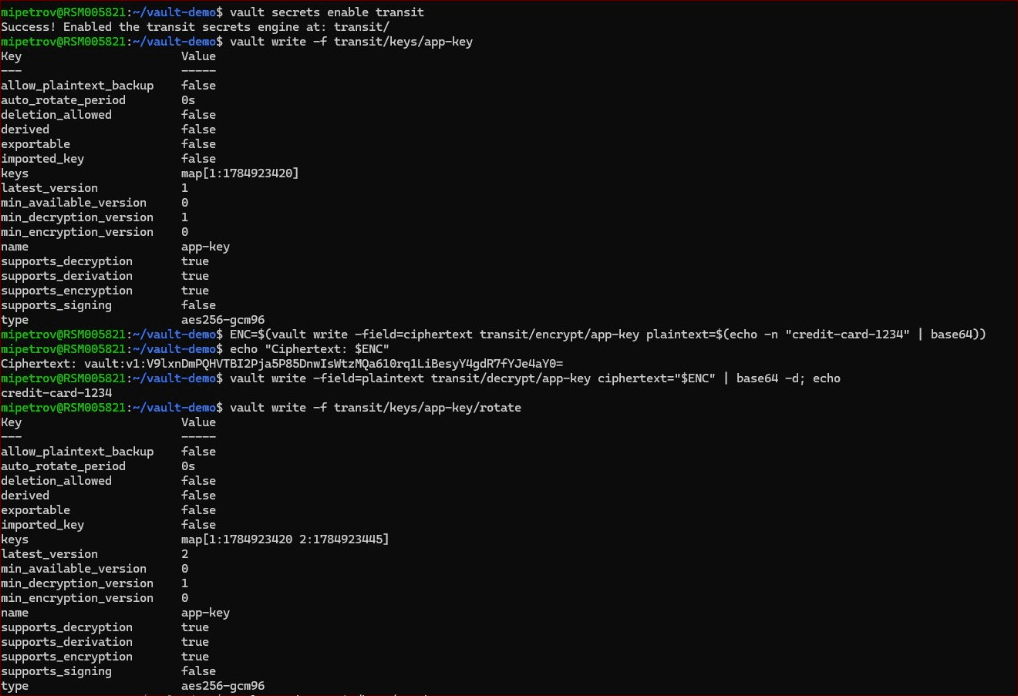
Because keys never leave Vault, a compromised application host can’t leak them. Rotate keys on a schedule and use min_decryption_version to retire old versions once data has been re-wrapped.
8. Keep TTLs short and revoke aggressively
Long-lived credentials are the enemy of secrets management. Every token and dynamic secret Vault issues carries a lease with a TTL — keep those TTLs short so exposure is naturally limited. And when something goes wrong, you need a kill switch: revoke a whole tree of leases by prefix in one command.
vault lease revoke -prefix auth/approle/
Better still, prefer dynamic secrets (for a database, cloud IAM, or PKI) over static ones: Vault generates credentials on demand and destroys them when the lease ends, so there are no long-lived database credentials to steal.
9. Explore and verify in the Vault UI
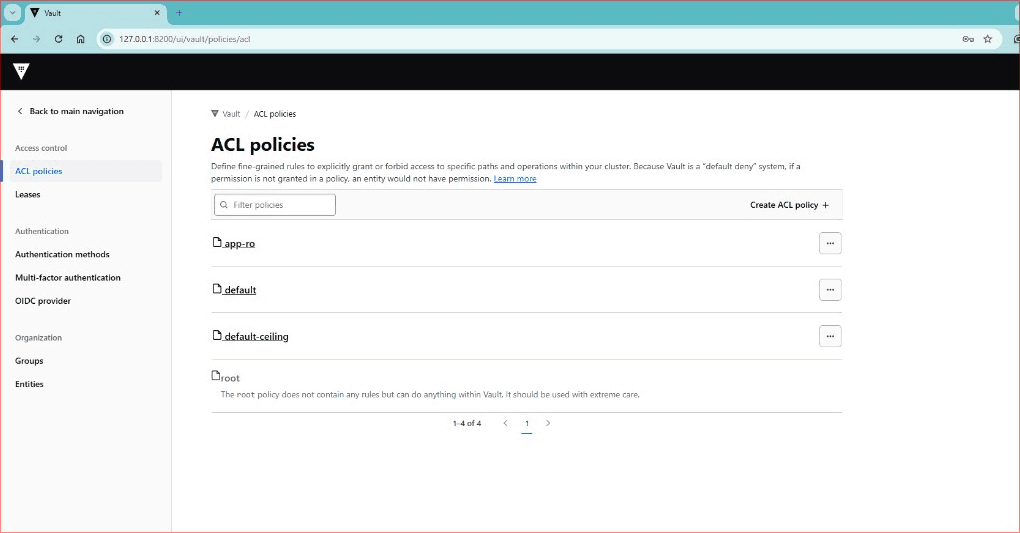
Everything above is CLI/API-driven — that’s how you automate Vault. But the built-in UI is excellent for visibility: reviewing which engines and auth methods are enabled, inspecting policies, and confirming a secret’s current version at a glance.
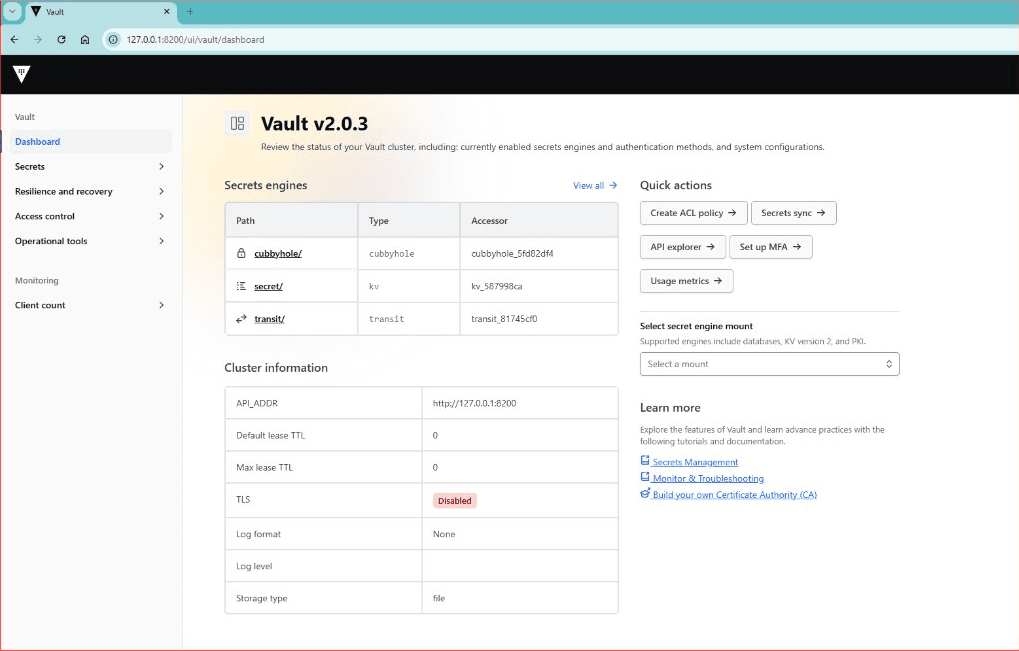
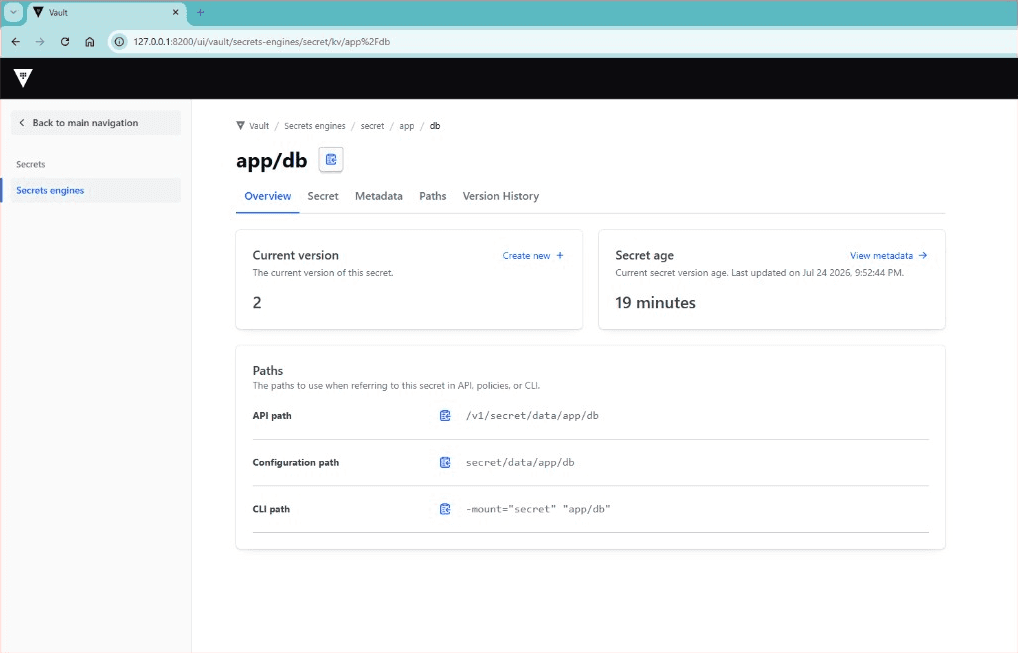
Use the UI for inspection and the occasional manual change; keep bulk operations and anything repeatable in code so it’s auditable and reproducible.
Common mistakes to avoid
- Using the root token in applications or CI instead of a scoped AppRole/Kubernetes token.
- Running with no audit device, so you have no record of who read what.
- Storing all unseal key shares together — or worse, committing them to Git.
- Long-lived, static secrets that are never rotated or revoked.
- Using KV v1 and losing the ability to roll back a bad or deleted secret.
- Never rotating Transit keys.
- Disabling TLS in production — we disable it here only because this is a local demo on 127.0.0.1; a real Vault must always use TLS.
The full command reference
Here is the whole flow end to end, so you can reproduce the setup in this article on a local Vault:
# 0) start a local dev-style server (file storage, TLS disabled for LOCAL demo only)
export VAULT_ADDR="http://127.0.0.1:8200"
# 1) initialize with Shamir shares + unseal
vault operator init -key-shares=5 -key-threshold=3
vault operator unseal # x3 (threshold)
vault status
# 2) audit device
vault audit enable file file_path=/vault/logs/audit.log
# 3) KV v2 + versioning
vault secrets enable -path=secret kv-v2
vault kv put secret/app/db user="app" password="s3cr3t-v1"
vault kv put secret/app/db user="app" password="s3cr3t-v2"
vault kv metadata get secret/app/db
# 4) least-privilege policy
vault policy write app-ro app-ro.hcl
vault token create -policy="app-ro"
# 5) AppRole for the app
vault auth enable approle
vault write auth/approle/role/app token_policies="app-ro" token_ttl=15m token_max_ttl=30m
vault read auth/approle/role/app/role-id
vault write -f auth/approle/role/app/secret-id
# 6) Transit encryption as a service
vault secrets enable transit
vault write -f transit/keys/app
vault write transit/encrypt/app plaintext=$(echo -n "hello" | base64)
vault write -f transit/keys/app/rotate
# 7) kill switch
vault lease revoke -prefix auth/approle/Frequently asked questions
What are the most important HashiCorp Vault secrets management best practices?
What is the difference between sealing and unsealing Vault?
Should applications use the root token?
KV v1 vs KV v2 — which should I use?
How do I revoke access quickly if a secret leaks?
What is the Transit engine used for?
What authentication methods does HashiCorp Vault support?
What are dynamic secrets in Vault, and how do they differ from static credentials?
How does HashiCorp Vault handle secret rotation and revocation?
How is Vault different from storing secrets in environment variables or config files?
Can Vault manage database credentials dynamically?
How does HashiCorp Vault fit into a zero-trust architecture?
Conclusion
Vault rarely fails at install time — it fails on the boring disciplines: nobody enabled audit, apps still carry the root token, and the unseal keys sit in one place. Get the HashiCorp Vault secrets management best practices in this guide right on day one — protected unseal keys, audit, KV v2, least privilege, AppRole, Transit, short TTLs — and Vault becomes the calmest, most secure part of your platform, keeping every secret your apps need safely under control. If you’d like help designing or hardening your Vault deployment, get in touch for a free consultation, or see our DevOps consulting and support.
The Vault deployments we’re called in to fix almost never have an install problem — they have a discipline problem. The three findings we see over and over: no audit device was ever enabled, applications are still using the root token, and all the unseal keys live in the same password manager. None of these are hard to fix; they’re exactly the practices above. Our rule of thumb in reviews is blunt — if a human or an application can do more than it strictly needs, that’s a finding. Get least privilege and audit right first, and everything else gets easier.
— Milan Petrović, Senior Cloud/DevOps Engineer · CKA, RHCE, RHCSA